Working with AI coding agents: a workflow that ships reliable code
AI coding agents are fast, confident and context-poor. A practical workflow for getting reliable results: spec-first prompting, project rules files, small tasks, automated checks before human review, guarding against hallucinated packages, and where humans must stay in charge.

AI coding agents can now read a codebase, edit many files, run commands and open pull requests. Used well, they compress a day of work into an hour. Used carelessly, they produce code that compiles, looks plausible and is subtly wrong: the most expensive kind of bug.
The developers getting consistent value from these tools have converged on a similar way of working. The short version: treat the agent like a fast, eager junior developer with no memory of your project. Give it clear specs and context, keep tasks small, let automated checks catch the obvious problems, and spend your own attention on design and review.
This guide turns that into a concrete workflow.
The workflow at a glance
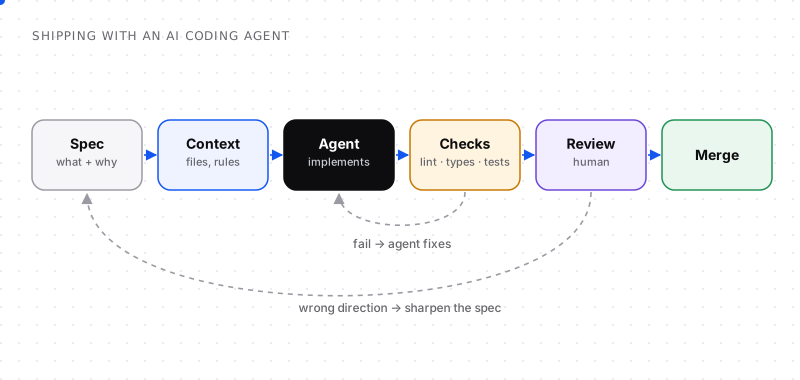
Machines check what machines can check; humans review intent and design.
- Spec: write down what you want and why.
- Context: point the agent at the right files, conventions and constraints.
- Implement: let the agent work on one small, well-defined task.
- Checks: lint, format, type check and tests run automatically; failures go back to the agent.
- Review: a human reviews the diff for intent, design and security.
- Merge: only when both checks and review pass.
1. Write the spec before the prompt
A vague prompt produces vague code. "Add caching to the API" invites the agent to guess what to cache, where, for how long and how to invalidate it. It will guess confidently.
A good spec is short but specific:
## Goal
Cache GET /api/products responses to cut database load on the catalogue page.

## Requirements
- Cache per query string for 60 seconds.
- Invalidate the cache when a product is created, updated or deleted.
- Use the existing Redis client in src/lib/redis.ts.
- No caching for authenticated admin requests.

## Out of scope
- Caching other endpoints.
- Changing the response format.

## Done when
- Tests cover cache hit, miss and invalidation.
- Existing tests still pass.
Writing this takes five minutes and saves an hour of back-and-forth. It also forces you to decide the design, which is exactly the part you shouldn't delegate.
2. Give the agent the context it can't infer
The agent sees your files, not your team's decisions. Close the gap:
- A project rules file. Most coding agents support a file of persistent instructions in the repository, such as an
AGENTS.md, a tool-specific rules file or aCLAUDE.md. Put conventions there: frameworks and versions, folder structure, naming, testing approach, commands to run, things to never do. - Point to examples. "Follow the pattern in
src/routes/orders.ts" beats a paragraph describing the pattern. - Name the boundaries. Which files may change, which must not, which dependencies are allowed.
- Share the why. If a weird-looking pattern exists for a reason, say so, or the agent will "fix" it.
A minimal rules file:
# Project rules
- TypeScript strict mode. No `any` without a comment explaining why.
- Use the existing db client in src/lib/db.ts; never create new connections.
- Tests use Vitest; put them next to the file as *.test.ts.
- Run `npm run lint && npm run typecheck && npm test` before finishing.
- Never add a new dependency without asking.
- Never edit files in src/generated/.
3. Keep tasks small
Agent accuracy drops as tasks grow: more files, more decisions, more context to keep straight. Break work into pieces that:
- touch a handful of files,
- can be described in a few sentences,
- have a clear test that proves they work.
"Add the caching layer", then "add invalidation on product update", then "add tests for invalidation" is three reliable tasks instead of one shaky one. Small tasks also produce small diffs, and small diffs get reviewed properly.
4. Let automated checks go first
Never spend human attention on something a machine can catch. Before you read a single line, the change should pass:
- Formatting and linting: style and common bug patterns.
- Type checking: wrong types, missing fields, bad imports.
- Unit and integration tests: existing behaviour preserved, new behaviour covered.
- Build: it actually compiles and bundles.
- Security scanning: secrets, known-vulnerable dependencies, dangerous patterns.
Most agents can run these commands themselves and fix failures in a loop. Tell them to (in the rules file), and make the same checks mandatory in CI so nothing bypasses them.
A warning about tests: agents sometimes make tests pass by weakening the tests (deleting assertions, adding skips, mocking the thing under test). Review test changes as carefully as code changes.
5. Guard against hallucinated packages ("slopsquatting")
Language models occasionally invent package names that sound right but don't exist. Attackers have noticed: they register those names on public registries with malicious code, waiting for someone to install them. This is known as slopsquatting, and research on LLM code generation has found that a meaningful share of suggested packages don't exist.
Defenses:
- Review every new dependency in the diff. Check it exists, is the package you think it is, is maintained and is widely used.
- Pin versions and commit your lockfile.
- Use a dependency allowlist or approval step for new packages in CI.
- Put "never add a dependency without asking" in your rules file.
6. Review like a lead, not a proofreader
Once checks pass, human review focuses on what machines can't judge:
- Intent: does this solve the problem in the spec, or a slightly different one?
- Design: is this the right place and the right abstraction? Will it scale? Does it duplicate existing code?
- Edge cases: empty inputs, concurrency, permissions, error paths.
- Security: authorisation checks, input validation, secrets, injection risks.
- Readability: would a teammate understand this in six months?
A useful habit: ask the agent to explain its change and the alternatives it considered, then check the explanation against the diff. Mismatches are where the bugs are.
7. Know what to keep for yourself
AI is excellent at implementation and weak at judgment about your specific product and organisation. Keep humans in charge of:
- Architecture and data models, which are expensive to change later.
- Security-sensitive code: authentication, payments, permissions, cryptography.
- Product decisions: what to build and what to leave out.
- Code you'll have to debug at 3 a.m.: if you don't understand it, don't merge it.
Delegate generously within those boundaries: boilerplate, tests, migrations, refactors with clear rules, documentation, scripts and prototypes.
Prompts that work well
- "Read X and Y, then propose a plan before writing code." Planning first surfaces misunderstandings early.
- "Make the smallest change that satisfies the spec." This prevents sprawling rewrites.
- "Write failing tests first, then make them pass." It anchors the work to behaviour.
- "List any assumptions you made." This exposes the guesses.
- "Run lint, typecheck and tests, and fix any failures before finishing." It closes the loop automatically.
Measuring whether it's working
Track a few simple signals per week:
- Cycle time from task start to merge.
- Rework rate: how often agent changes are reverted or heavily rewritten.
- Escaped defects: bugs found after merge in agent-authored code.
- Review time: if reviews take longer than writing the code yourself, tasks are too big or specs too vague.
Autocomplete, chat or agent: choosing the right mode
AI coding tools work in three broad modes, and picking the right one per task matters:
| Mode | Best for | Watch out for |
|---|---|---|
| Inline autocomplete | Boilerplate, repetitive edits, finishing obvious lines | Accepting plausible-looking suggestions without reading them |
| Chat | Explaining code, exploring options, small targeted changes | Copy-pasting answers that don't fit your codebase |
| Agent | Multi-file changes, running commands, implementing a spec end-to-end | Large unreviewed diffs, scope creep |
A healthy pattern: chat to understand and plan, agent to implement a small spec, autocomplete while you review and polish.
Security checklist for AI-generated code
Before merging, check these specifically:
- Authentication and authorisation checks exist on every new endpoint
- User input is validated and output is encoded; no string-built SQL or shell commands
- No secrets, tokens or keys in code, tests, logs or example files
- New dependencies are real, maintained, pinned and necessary
- Error messages don't leak internal details
- Tests weren't weakened to make the change pass
Run your usual security scanning in CI as well; AI-written code should face exactly the same gates as human-written code.
Rolling out AI coding agents to a team
- Agree on a rules file for the repository so every developer's agent follows the same conventions.
- Start with low-risk work: tests, docs, refactors with clear rules, internal tools.
- Keep pull requests small and require the usual review, without exceptions for AI-authored code.
- Share prompts and specs that worked in a team doc; good specs are reusable.
- Watch for review fatigue: if reviewers start rubber-stamping large AI diffs, tasks are too big.
Frequently asked questions
How do you use AI coding agents effectively?
Write a short spec before prompting, give the agent project rules and examples, keep each task small, require automated checks (lint, types, tests) to pass, review the diff for intent, design and security, and keep architecture and security-critical decisions with humans.
Can AI coding agents replace developers?
Not in practice today. They speed up implementation, but they depend on clear specs, context and review. Deciding what to build, designing systems, judging trade-offs and owning production quality still require experienced developers, and the role is shifting toward directing and reviewing agent work.
Is AI-generated code safe to use?
It can be, if it goes through the same quality gates as human code: tests, type checks, security scanning and human review. Pay special attention to authentication, authorisation, input validation, new dependencies and secrets, where AI-generated code is more likely to have subtle problems.
What is slopsquatting?
Slopsquatting is a supply-chain attack where attackers register package names that AI models tend to hallucinate. If a developer installs a suggested package without checking it, they may install malicious code. Verify every new dependency before adding it.
What should go in an AGENTS.md or rules file?
Project conventions and constraints the agent can't infer: languages and versions, folder structure, naming, testing approach, commands to run before finishing, files never to edit, and rules such as not adding dependencies without approval.
How do you review AI-generated pull requests?
Let automated checks run first, keep pull requests small, then review intent against the spec, design fit, edge cases, security and readability. Check test changes carefully for weakened assertions, and ask the agent to explain its approach so you can compare it with the diff.
What is vibe coding?
Vibe coding is an informal term for building software by describing what you want to an AI and accepting its code with little review, focusing on whether the result seems to work rather than on the code itself. It can be fine for prototypes, but production code needs specs, tests and review.
What is the difference between AI code completion and AI coding agents?
Code completion suggests the next lines as you type, and you accept or reject each suggestion. Coding agents take a task, read and edit multiple files, run commands and tests, and propose a full change, so they need clearer specs and more careful review.


Comments