What to automate first: a simple framework for picking AI automations that pay off
Most automation projects fail because they automate the wrong thing. A practical framework to score tasks by frequency, time, risk and clarity, decide between plain scripts and AI, estimate payback, and pick your first three automations.

"We should automate this with AI" is one of the most common sentences in any team right now, and one of the most expensive when it's applied to the wrong task. The failure pattern is familiar: someone builds an impressive automation for a process that happens twice a month, or one where a single mistake is costly, and six weeks later it's quietly switched off.
The teams that get real value from automation pick their targets with a simple, almost boring discipline. This guide gives you that discipline: a scoring framework, a decision tree for when to use AI versus a plain script, a payback calculation and a list of proven first automations.
The core idea: frequency × time × safety
A task is a good automation candidate when it is:
- Frequent: it happens daily or weekly, not quarterly.
- Time-consuming in total: small tasks repeated many times add up.
- Low-risk if wrong: mistakes are cheap, visible and reversible.
- Clearly defined: you can describe what "done right" looks like.
Plot your tasks on two axes, how often they happen and how costly a mistake would be, and four zones appear.
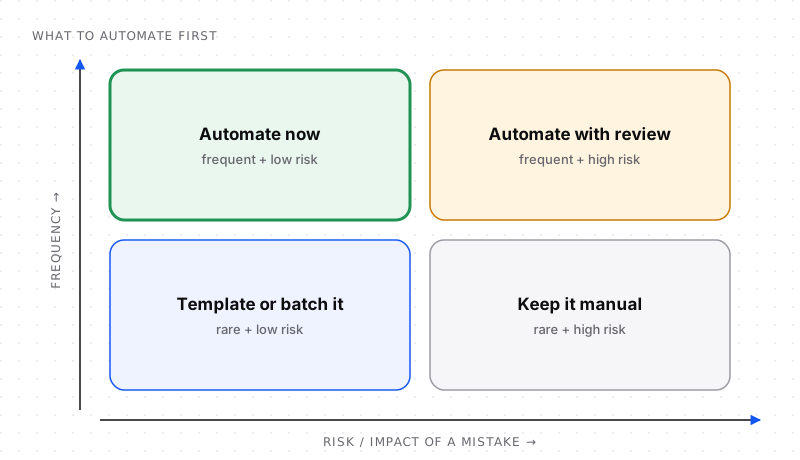
Start in the top-left quadrant. It's where nearly all early wins live.
- Automate now (frequent, low risk): tagging, sorting, data entry, reminders, report generation.
- Automate with review (frequent, high risk): customer replies, invoices, contract summaries. The automation drafts, a human approves.
- Template or batch it (rare, low risk): a checklist or saved template often beats a full automation.
- Keep it manual (rare, high risk): the effort and risk of automating outweigh the benefit.
Step 1: list every repetitive task for two weeks
You can't choose well from memory. For two weeks, have each person jot down tasks that feel repetitive, with a rough time per occurrence. A shared sheet with five columns is enough:
| Task | How often | Minutes each | Who does it | What goes wrong if it's wrong? |
|---|---|---|---|---|
| Tag and route support emails | 40/day | 1 | Support | Slow response, easily fixed |
| Weekly metrics report | 1/week | 90 | Ops | Wrong numbers in a meeting |
| Copy leads from form to CRM | 15/day | 3 | Sales | Lost lead |
| Draft replies to pricing questions | 10/day | 5 | Sales | Wrong price quoted |
| Annual vendor contract review | 4/year | 120 | Finance | Legal/financial exposure |
Step 2: score each task
Give each task a score from 1 to 5 on four criteria:
- Frequency: 1 = yearly, 5 = many times a day
- Time saved per month: 1 = under an hour, 5 = 20+ hours
- Safety: 1 = mistakes are costly or irreversible, 5 = mistakes are trivial and easy to fix
- Clarity: 1 = "it depends", 5 = clear rules and examples exist
Score = Frequency + Time + Safety + Clarity. Anything above 15 is a strong candidate; below 10, leave it alone for now.
| Task | Freq | Time | Safety | Clarity | Score |
|---|---|---|---|---|---|
| Tag and route support emails | 5 | 4 | 5 | 4 | 18 |
| Copy leads to CRM | 5 | 3 | 4 | 5 | 17 |
| Weekly metrics report | 3 | 2 | 3 | 5 | 13 |
| Draft pricing replies | 4 | 3 | 2 | 3 | 12 (with review) |
| Vendor contract review | 1 | 2 | 1 | 2 | 6 |
The ranking usually surprises people: the glamorous ideas score lower than the boring ones.
Step 3: decide whether it needs AI at all
Many "AI automation" projects don't need AI. Use the simplest tool that works:
- The input is structured and the rules are clear (form fields, CSV columns, if-this-then-that): use a plain automation or script. It's cheaper, faster, deterministic and easier to debug.
- The input is unstructured but the output is simple (classify this email, extract the invoice total, summarise this ticket): use AI for one step inside an otherwise normal workflow.
- The task requires multi-step judgment with tools (research a lead across sites, investigate a bug): consider an AI agent, with limits and review.
A useful rule: AI should handle the fuzzy step, not the whole workflow. Fetching data, moving files, sending notifications and updating records should stay in regular, predictable automation nodes.
Step 4: estimate the payback
A quick, honest calculation stops pet projects early:
Monthly hours saved   = occurrences per month × minutes saved each ÷ 60
Monthly value         = hours saved × loaded hourly cost
Monthly running cost  = tool subscriptions + AI usage + hosting
Build + maintenance   = hours to build × hourly cost (+ ~10–20% of that per month to maintain)

Payback (months)      = build cost ÷ (monthly value − monthly running cost)
Example: support email tagging. 40 emails a day × 22 working days = 880 per month. Saving 1 minute each is about 14.7 hours a month. At a loaded cost of $30/hour that's about $440 of time per month. If AI and tools cost $40 a month and building takes 10 hours ($300), payback is under a month.
Example: annual contract review. 4 per year, 2 hours each, means 8 hours a year. Even a perfect automation saves less than one working day per year, and the risk is high. Don't automate it; make a checklist.
Be conservative: count only time genuinely freed, include the time people will spend reviewing outputs, and assume some maintenance every month.
Step 5: start small and measure
For your top candidate:
- Automate one narrow slice (one email category, one form, one report).
- Run it in parallel with the manual process for a week or two and compare.
- Log every output so you can measure accuracy, not just believe it.
- Add a human review step for anything customer-facing at first.
- Track hours saved for real, not just estimated.
Then expand to the next slice. Small automations that work beat big ones that are "almost there".
Twelve proven first automations
These consistently score well across teams:
- Classify and route inbound email or support tickets.
- Copy form submissions into your CRM and notify the owner.
- Summarise long threads or meetings into decisions and action items.
- Extract data from invoices and receipts into a spreadsheet.
- Daily or weekly metrics digest posted to Slack.
- Enrich new leads with company size and industry.
- Draft replies to common questions for human review.
- Tag and rename uploaded documents so they are easy to find.
- Reminders for overdue tasks or invoices.
- Social post drafts from a new blog post.
- Changelog drafts from merged pull requests.
- Meeting scheduling follow-ups with agenda templates.
Mistakes to avoid
- Automating a broken process. Fix the process first, or you'll just make mistakes faster.
- Skipping the measurement. Without a baseline, you can't prove value or spot problems.
- Letting AI take irreversible actions without review.
- Building for edge cases first. Handle the 80% case and route the rest to a person.
- Forgetting ownership. Every automation needs an owner who gets the alert when it breaks.
AI automation ideas by team
If you're not sure where to look, these are reliable starting points for each function:
| Team | Good first automation | AI's role |
|---|---|---|
| Support | Tag, prioritise and route tickets; draft answers to common questions | Classify and draft |
| Sales | Enrich new leads and score fit; summarise calls into CRM notes | Extract and summarise |
| Marketing | Turn a blog post into social drafts; tag and organise content | Rewrite and classify |
| Finance | Extract invoice data; flag unusual expenses for review | Extract and detect anomalies |
| HR | Answer policy questions from the handbook; schedule interviews | Retrieval Q&A |
| Engineering | Summarise incidents; draft changelogs from merged pull requests | Summarise |
| Operations | Weekly metrics digest; reminders for overdue tasks | Summarise and notify |
Build or buy?
Before building, check whether a tool you already pay for has the automation built in: helpdesks, CRMs and accounting tools increasingly ship AI features. A rough guide:
- Buy (or switch on) when the task is common across companies, like ticket tagging, meeting notes or invoice extraction, and a mature product does it inside a tool you already use.
- Build when the workflow is specific to how your business works, connects several tools in a particular way, or handles data you want to keep under your control.
- Build with low-code (n8n, Zapier, Make) as the middle ground: faster than custom code, more flexible than a single product's feature.
How to document an automation so it survives
Automations outlive the people who built them. For each one, keep a one-page note with: what it does, the trigger, the tools and accounts it uses, who owns it, how to pause it, what it costs per month and what to check when it fails. It takes ten minutes and saves hours the first time something breaks while its builder is on holiday.
Frequently asked questions
What tasks should I automate first?
Start with tasks that are frequent, time-consuming in total, low-risk if done wrong and clearly defined, such as routing support emails, copying form data into a CRM, generating recurring reports and summarising meetings. Score candidates and pick the highest scorers.
How do I know if a task is worth automating?
Estimate monthly hours saved (occurrences × minutes saved), multiply by the hourly cost, subtract running costs and compare with the build cost. If payback is within a few months and the risk of mistakes is low, it is usually worth it.
When should I use AI instead of a regular automation?
Use AI when a step involves unstructured input such as free-text emails, documents or images, or requires judgment like classification or summarisation. If the input is structured and the rules are clear, a regular automation or script is cheaper, faster and more reliable.
What should not be automated?
Rare tasks, tasks where a mistake is costly or irreversible, processes that are still changing or poorly defined, and decisions that need accountability, empathy or legal judgment. These are better handled with checklists, templates or human-reviewed drafts.
How do I calculate the ROI of automation?
ROI compares the value of time saved with the cost of building and running the automation. Calculate monthly hours saved × hourly cost, subtract monthly running costs, then divide the build cost by that net monthly value to get the payback period in months.
What are the best tools for AI automation?
Popular options include n8n (flexible and self-hostable), Zapier (easiest, largest app catalogue) and Make (powerful visual scenarios). Developers often use scripts with an LLM API. Choose based on your skills, data privacy needs, integrations and budget.
What are good examples of AI automation for small businesses?
Routing and drafting replies to customer emails, extracting data from invoices and receipts, summarising meetings into action items, enriching and scoring new leads, turning blog posts into social media drafts, and sending a weekly metrics digest.
Should I build or buy AI automation?
Switch on built-in AI features or buy a product when the task is common, such as ticket tagging or meeting notes. Build, often with a low-code tool like n8n, Zapier or Make, when the workflow is specific to your business, connects several tools or handles data you want to control.


Comments