Agent memory explained: short-term, long-term, and when to forget
How AI agents remember things between steps and sessions: the four kinds of memory, how to write and retrieve memories, the summarise-vs-retrieve trade-off, stale memories, privacy, and a simple design you can build this week.

Language models don't remember anything. Each request starts from zero: the model sees only the tokens you send. Yet users expect an assistant to remember their name, their preferences, the project they described last week and the decision they made ten messages ago.
Agent memory is everything you build to close that gap. Done well, it makes an agent feel attentive and saves users from repeating themselves. Done badly, it fills the context with stale, contradictory or private details and makes the agent worse than having no memory at all.
This guide explains the types of agent memory, how information flows in and out of it, and how to design a memory system that stays useful over time.
Why models need external memory
There are only two places an agent's "knowledge" can live:
- The model's weights, fixed at training time and not something you update per user.
- The context window, rebuilt on every request.
So "memory" always means: store information somewhere outside the model, then put the right parts back into the context at the right time. The hard problems are deciding what to store, how to find it again, and when to throw it away.
The four kinds of agent memory
It helps to borrow terms from cognitive science, because agent memory splits along the same lines.
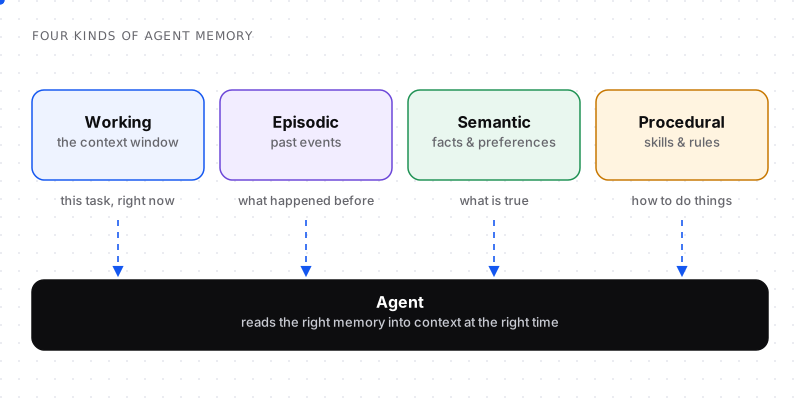
Each kind answers a different question for the agent.
Working memory (short-term)
The context window itself: the current instructions, the conversation so far and recent tool results. It is fast and precise but small and temporary. Everything else has to be loaded into it to be used.
Episodic memory (what happened)
A record of past events: previous conversations, completed tasks, actions taken and their outcomes. "Last Tuesday you asked me to draft the Q3 report and you preferred the shorter version." Usually stored as timestamped summaries.
Semantic memory (what is true)
Distilled facts and preferences, independent of when they were learned: "User's company: Acme. Prefers TypeScript. Time zone: IST. Team size: 12." This is the most useful kind for personalisation and the easiest to keep tidy.
Procedural memory (how to do things)
Learned rules and skills: "When deploying, always run migrations first." "This user wants commit messages in the imperative mood." Often stored as instructions or examples that get added to the system prompt for relevant tasks.
How memory flows: the write path and the read path
Every memory system has two paths.
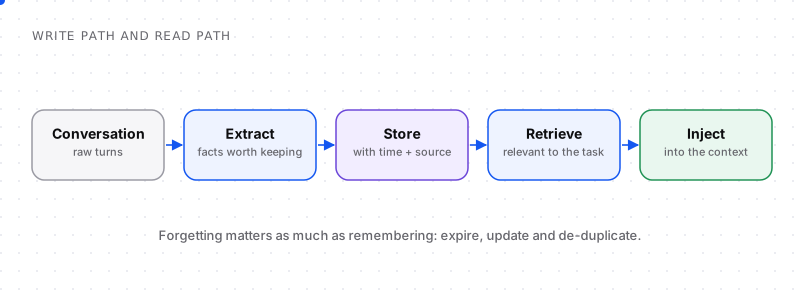
Writing decides what to keep. Reading decides what to use.
The write path: deciding what to keep
Storing every message verbatim is easy and almost useless: it recreates the "long noisy context" problem in a database. Instead, extract memories worth keeping:
- Explicit preferences: "I prefer short answers."
- Stable facts: names, roles, tools, constraints.
- Decisions and their reasons: "We chose Postgres over MongoDB because of reporting needs."
- Outcomes of tasks: what was done, what worked, what failed.
A common approach is to run a small, cheap model after each conversation (or every few turns) with a prompt like "Extract durable facts about the user and project. Ignore small talk. Output JSON."
Each stored memory should carry metadata:
{
  "id": "mem_8f2a",
  "type": "semantic",
  "content": "Prefers TypeScript for new services",
  "source": "conversation 2026-10-14",
  "created_at": "2026-10-14T09:12:00Z",
  "updated_at": "2026-10-14T09:12:00Z",
  "confidence": "explicit"
}
Timestamps and sources are not optional. They are how you resolve conflicts and expire stale information later.
The read path: finding what's relevant
On each request, retrieve the memories that matter for this task:
- Always load a small profile: a handful of core semantic facts (name, role, key preferences) fits in a few hundred tokens.
- Retrieve episodic memories by relevance using search (keyword, vector, or both) against the current message.
- Filter by recency and type: last week's decisions usually beat last year's.
- Cap the budget: memory gets a fixed slice of the context, like every other source.
Then inject them in a clearly labelled block, so the model knows these are remembered facts, not new instructions:
<memory>
- Prefers TypeScript for new services (from 2026-10-14)
- Team chose Postgres over MongoDB for reporting needs (from 2026-09-30)
</memory>
Summarise or retrieve?
There are two broad strategies for long conversations and long-running agents, and most systems combine them.
| Running summary | Retrieval | |
|---|---|---|
| How it works | Keep one evolving summary of the conversation | Store items separately, fetch the relevant ones |
| Strengths | Simple, always available, preserves flow | Scales to huge histories, precise |
| Weaknesses | Loses detail, can drift over many updates | Can miss items, needs good search |
| Best for | A single long session | Many sessions over weeks or months |
A practical default: running summary within a session, retrieval across sessions, plus a small always-loaded profile.
The hard part: forgetting
Memory systems rarely fail because they forget too much. They fail because they remember wrong things for too long.
Stale memories
"User works at Acme" was true in March. In September they mention a new job. If both facts live in memory, the agent may use either. Fixes:
- Update instead of append: when a new fact contradicts an old one about the same subject, replace it and keep the old one only as history.
- Prefer recent: when conflicts remain, give the model dates and tell it the newer fact wins.
- Expire volatile facts: some things (current project, current sprint) should have a time-to-live.
Duplicates and noise
The same preference extracted ten times wastes budget. Deduplicate on write by checking for existing memories with similar content.
Wrong inferences
If the extractor guesses ("user seems to dislike Python") from weak evidence, that guess can harden into a "fact". Mark the confidence (explicit statement vs inference) and prefer explicit memories.
Let users see and edit memory
The single best fix for bad memory is user control: a page that lists what the agent remembers, with edit and delete buttons. It builds trust and cleans your data for free.
Privacy and safety
Memory turns an assistant into a store of personal data, so treat it that way:
- Don't store secrets: passwords, API keys, card numbers and health details should be filtered out at write time.
- Scope memory per user (and per workspace), and enforce it on the read path, not just in prompts.
- Honour deletion: when a user deletes a memory or their account, remove it from every store, including any vector index.
- Be careful with memory from untrusted sources: content an agent read on the web should not become a trusted "fact" about the user.
- Tell users what is remembered and why, in your privacy policy and in the product.
A simple memory design you can build this week
You do not need a specialised framework to start:
- A
memoriestable with id, user_id, type, content, source, created_at, updated_at and an optional embedding. - An extraction step after each conversation using a cheap model and a strict JSON schema.
- A merge step that updates existing memories on the same subject instead of adding duplicates.
- A read step that loads up to five profile facts plus the top five relevant memories, within a fixed token budget.
- A "What I remember" page where users can review and delete memories.
For agents doing long tasks, add one more piece: a scratchpad, a notes file the agent can write to during the task (findings, decisions, open questions) and read back instead of re-reading its entire transcript.
How to know your memory is working
Memory quality is measurable. Track:
- Recall in evals: give the agent test conversations and check it uses the right remembered facts.
- Contradiction rate: how often stored memories conflict with each other.
- User corrections: how often users say "that's wrong" or delete memories.
- Context share: how many tokens memory takes per request, against its budget.
Good memory is invisible: users simply notice that they no longer have to repeat themselves.
Agent memory vs RAG: what's the difference?
They use similar machinery (storage plus retrieval), but they answer different questions:
| RAG | Agent memory | |
|---|---|---|
| What it stores | Shared knowledge: docs, manuals, policies | Things learned from interactions: preferences, facts, past events |
| Who writes it | Your team, ahead of time | The agent, during and after conversations |
| Scope | Usually the same for every user | Usually per user or per workspace |
| Changes | When documents are updated | Constantly, as users interact |
| Main risk | Outdated or irrelevant documents | Stale, wrong or private memories |
Many systems use both: RAG for "what does our product do?" and memory for "what does this user care about?"
Tools and frameworks for agent memory
You can build memory yourself, but several tools package common patterns:
- Agent frameworks with built-in state. LangGraph, for example, separates short-term thread state (saved with checkpointers so a conversation can resume) from a long-term store for facts that persist across threads.
- Dedicated memory layers. Tools such as Mem0 and Zep focus on extracting, storing and retrieving user memories and expose them through simple APIs.
- Stateful agent servers. Letta (the project that grew out of the MemGPT research) runs agents that manage their own memory tiers, including editing what they remember.
The concepts in this guide (extraction, metadata, retrieval, budgets and forgetting) apply whichever tool you choose. Evaluate them on how they handle updates and deletion, not just retrieval.
Self-editing memory
A powerful pattern popularised by the MemGPT research is letting the agent manage its own memory with tools: save_memory, update_memory and search_memory. Instead of a fixed extraction step, the agent decides during the conversation what is worth keeping.
It's flexible, but it needs guardrails: limit how much can be written per session, validate memory content (no secrets, no instructions copied from untrusted documents), and keep a log of every memory change.
Frequently asked questions
Do AI agents have memory?
Not by default. Language models are stateless, so each request only sees the tokens sent with it. Agents "remember" because the application stores information externally (in a database, files or a search index) and adds the relevant parts back into the context on later requests.
What is the difference between short-term and long-term memory in AI agents?
Short-term (working) memory is the current context window: the conversation and tool results for the task at hand. Long-term memory is stored outside the model and persists across sessions, such as facts, preferences, past events and learned rules, and is retrieved into the context when relevant.
How do you give an LLM long-term memory?
Extract durable facts and events from conversations, store them with timestamps and sources, retrieve the relevant ones for each new request using search, and inject them into the context in a clearly labelled block within a fixed token budget.
Should I use a vector database for agent memory?
It helps when you have many memories and need to find them by meaning, but it isn't required to start. A regular database table with keyword search and a small always-loaded profile works for many apps. Add vector search when retrieval quality becomes the bottleneck.
How do you handle outdated or conflicting memories?
Store timestamps and sources with every memory, update existing memories when new information contradicts them instead of adding duplicates, expire volatile facts, and when conflicts remain, show the model the dates and instruct it to prefer the most recent information.
Is it safe to store user data in agent memory?
It can be, if you treat memory as personal data: filter out secrets and sensitive details at write time, scope memories strictly per user, support deletion everywhere the data is stored, and tell users clearly what is remembered and let them edit it.
What is the difference between RAG and agent memory?
RAG retrieves shared knowledge your team prepared, such as documentation, for every user. Agent memory stores information the agent learned from interactions, such as a user's preferences, facts and past events, usually scoped per user and updated constantly. Many apps use both.
Which frameworks support long-term memory for AI agents?
Agent frameworks such as LangGraph provide short-term thread state and long-term stores, dedicated memory layers such as Mem0 and Zep handle extraction and retrieval of user memories, and Letta runs stateful agents that manage their own memory. You can also build a simple version with a database and search.


Comments