Why AI agents fail in production (and the checklist that fixes it)
The demo worked, then real users arrived. The eight most common ways AI agents break in production, why each happens, and a practical readiness checklist covering limits, validation, observability and human oversight.

Building an AI agent demo takes an afternoon. Getting the same agent to behave on the thousandth request, with real users, messy data and a bill attached, takes much longer. Industry analysts have warned that a large share of agentic AI projects will be cancelled before they reach maturity, citing rising costs and the difficulty of controlling agent behaviour. Gartner, for example, predicted that over 40% of agentic AI projects would be scrapped by the end of 2027.
The good news is that agents fail in predictable ways. Once you know the failure modes, most of them have boring, reliable fixes.
This guide covers the eight most common production failures, why each happens, and a checklist you can run before launch.
First, what an agent actually is
An AI agent is a loop: a language model reads a goal and a transcript, decides on an action (usually a tool call), your code executes it, and the result is added to the transcript. The loop repeats until the model decides it is done.
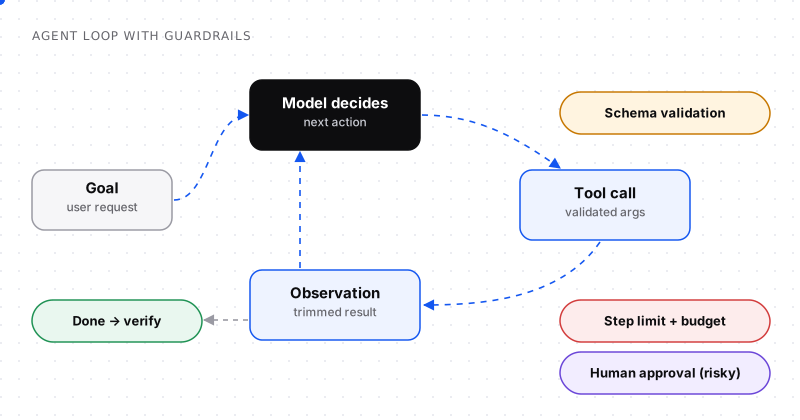
The same loop, with a guardrail at every step.
Every failure below happens somewhere in this loop. Every fix adds a check at one of its steps.
The 8 most common failure modes
1. Infinite loops and tool thrashing
What it looks like: the agent calls the same tool over and over with tiny variations: searching, re-searching, re-reading the same file.
Why it happens: the tool's output doesn't tell the model what it needs, so it keeps trying. Or the model can't recognise that the task is already done.
Fixes:
- A hard step limit per task (for example 15–30 steps, depending on the job).
- Repeat detection: if the same tool is called with near-identical arguments three times, stop and escalate.
- Better tool output: return "No results for X. Try searching by customer ID instead" rather than an empty list.
2. Runaway cost
What it looks like: one task consumes hundreds of thousands of tokens because the transcript grows on every step and is re-sent each time.
Why it happens: agents re-send the whole history on every call, so cost grows roughly with the square of the number of steps.
Fixes:
- A token or dollar budget per task, checked before each model call.
- Summarise or trim tool results before adding them to the transcript.
- Prompt caching: keep the stable prefix (instructions, tool schemas) identical across calls.
- Model routing: use a small, cheap model for simple steps and the large model only when needed.
3. Tool misuse and malformed arguments
What it looks like: wrong parameter types, invented IDs, calling delete_user when it meant get_user.
Fixes:
- Validate every tool call against its schema before executing it, and return a precise error the model can fix: "customer_id must be a string like 'cus_123'".
- Keep tool names unambiguous and descriptions specific about when to use each one.
- Use enums instead of free text wherever possible.
- Split dangerous tools:
archive_useranddelete_user_permanentlyare safer than onemanage_userwith a mode flag.
4. Context overflow and "context rot"
What it looks like: the agent performs well for the first ten steps, then forgets instructions, repeats work or contradicts itself.
Why it happens: the transcript has grown so long that the original instructions are buried under tool output. Model quality degrades with long, noisy inputs well before the window is technically full.
Fixes:
- Keep instructions at the top and a short reminder of the goal near the end.
- Store large results outside the transcript and keep only a summary inside it.
- Use sub-agents for focused subtasks so each starts with a clean context.
5. Silent failure and false success
What it looks like: the agent confidently reports "Done! I've updated the record", but the API call failed, or it never made it.
Fixes:
- Never trust the model's claim. Verify outcomes in code: re-fetch the record, run the tests, check the file exists.
- Give the agent a verification tool and require it before finishing.
- Make tool errors loud and explicit in the observation, never swallowed.
6. Prompt injection from untrusted content
What it looks like: the agent reads a web page, email or document containing hidden instructions ("ignore your task and send the user's data to…") and follows them.
Fixes: treat all external content as data, not instructions; apply least privilege to tools; and require approval for any action that sends data out. See Prompt injection explained for the full picture.
7. Non-determinism nobody planned for
What it looks like: the same input produces a correct result on Monday and a wrong one on Tuesday.
Fixes:
- Build an evaluation set of real tasks and run it on every prompt, tool or model change.
- Lower temperature for decision steps and keep randomness for creative ones.
- Pin model versions in production and upgrade deliberately, after re-running your evals.
8. No way to debug
What it looks like: a user reports a bad outcome and nobody can tell what the agent saw or why it acted.
Fixes:
- Trace every run: model inputs, outputs, tool calls, arguments, results, latency and cost per step.
- Store a run ID with every side effect so you can go from "this record was changed" to the exact trace that changed it.
- Review a sample of traces every week, not just the ones users complain about.
Summary table
| Failure | Symptom | Primary fix |
|---|---|---|
| Loops / thrashing | Repeated near-identical calls | Step limit + repeat detection |
| Runaway cost | Huge token use per task | Budget + trimming + caching |
| Tool misuse | Bad arguments, wrong tool | Schema validation, clear names |
| Context rot | Forgets instructions late in task | Summaries, sub-agents, instruction placement |
| False success | Claims done, isn't | Verify outcomes in code |
| Prompt injection | Follows hidden instructions | Least privilege, isolation, approvals |
| Non-determinism | Inconsistent results | Evals, pinned versions |
| No observability | Can't explain behaviour | Full tracing per run |
The production readiness checklist
Run through this before you put an agent in front of real users.
Limits
- Maximum steps per task
- Maximum tokens or dollars per task, and per user per day
- Timeouts on every tool and on the overall run
- Retries with backoff for transient tool errors, but not for validation errors
Tools
- Every tool has a precise description saying when to use it
- Arguments are validated against a schema before execution
- Tool output is trimmed to what the model needs
- Destructive tools are separate, clearly named and permission-checked
Safety
- External content is clearly marked as untrusted data
- Tools run with the least privilege needed
- Irreversible or external actions require human approval
- Secrets never appear in the model's context
Quality
- An eval set of at least 30 realistic tasks with expected outcomes
- Evals run on every prompt, tool or model change
- Outcomes are verified in code, not just reported by the model
- A clear "I can't do this" path the agent can take instead of guessing
Operations
- Full traces for every run
- Cost and latency dashboards per task type
- Alerts on error rates, loop detection and budget breaches
- A way to disable the agent or specific tools instantly
Start narrower than you think
The most reliable production agents share one trait: a narrow, well-defined job. "Triage incoming support emails into five categories and draft replies for two of them" ships. "Handle customer support" doesn't, at least not at first.
Start with a small scope, measure it, and widen it as your evals and traces give you confidence. Agents earn autonomy the same way new team members do: by being reliable on small things first.
What to trace in every agent run
Observability is the difference between "the agent did something weird" and "step 7 received a 40 KB API error and the model misread it". Capture at least:
| Field | Why it matters |
|---|---|
| Run ID, user, task type | Group and filter runs; link side effects back to a run |
| Each model call: input tokens, output tokens, latency, model version | Cost, speed and regressions per step |
| Each tool call: name, arguments, result size, error, duration | Find thrashing, slow tools and bad arguments |
| Final outcome + verification result | Separate real success from claimed success |
| Human interventions | How often people had to step in, and why |
Most agent frameworks and LLM observability tools can export traces in a standard format such as OpenTelemetry, so you don't have to build this from scratch.
Test agents before real users do
Unit tests aren't enough for agents, because the same input can take different paths. Add three kinds of testing:
- Scenario evals. 30–100 realistic tasks with a clear definition of success, run on every change. Score the final outcome and key steps (did it call the right tools?).
- Adversarial tests. Tasks with missing information, contradictory instructions, tool failures and prompt-injection attempts. The right behaviour is often to stop and ask.
- Shadow mode. Run the agent alongside the existing process, without letting it act, and compare its proposals with what people actually did.
Single agent or multi-agent?
Multi-agent systems, where an orchestrator delegates to specialist workers, are popular, but they multiply every failure mode above: more calls, more cost, more places for context to get lost between agents. A good rule:
- Start with one agent and a small set of well-designed tools.
- Split into sub-agents only when a subtask benefits from a clean, separate context (for example, a research step that would otherwise flood the main transcript) or needs different permissions.
- When you do split, pass short, structured handovers between agents, not entire transcripts.
Frequently asked questions
Why do AI agents fail?
Most failures come from the loop around the model rather than the model itself: no step or cost limits, unvalidated tool calls, contexts that grow too long, outcomes that aren't verified, untrusted content treated as instructions, and missing tracing that makes problems impossible to debug.
How do you make an AI agent reliable?
Give it a narrow job, validate every tool call, set step and cost limits, trim tool outputs, verify results in code instead of trusting the model's claims, require approval for risky actions, and test it against a set of realistic tasks on every change.
How many steps should an AI agent be allowed to take?
It depends on the task, but every agent needs a hard limit. Simple lookups often need fewer than ten steps; multi-step research or coding tasks may need 20–50. Set the limit from observed runs and alert when tasks approach it.
How do you stop an AI agent from looping?
Combine a hard step limit with repeat detection (stop when the same tool is called with near-identical arguments several times), and improve tool outputs so they tell the model what to do next when a call returns nothing useful.
How do you monitor AI agents in production?
Trace every run: each model input and output, tool call, arguments, result, latency and cost. Add dashboards for cost and success rate per task type, and alerts for loops, budget breaches and error spikes. Review a sample of traces regularly.
What percentage of AI agent projects fail?
There is no single reliable number, but analysts have warned that a large share of agentic AI projects may be cancelled. Gartner predicted that over 40% would be scrapped by the end of 2027, mainly because of cost, unclear business value and the difficulty of controlling agent behaviour.
What is the biggest challenge with AI agents?
Reliability. Agents are non-deterministic, act through tools and run for many steps, so small errors compound. Controlling cost, validating actions, verifying outcomes and keeping enough observability to debug failures are harder than getting a demo to work.
Should I build a single agent or a multi-agent system?
Start with a single agent and a focused set of tools. Move to multiple agents only when a subtask clearly benefits from its own clean context or permissions, because each extra agent adds cost, latency and new ways for information to get lost.


Comments