Context engineering: the skill that replaced prompt engineering
Why the biggest lever in LLM apps is no longer the wording of your prompt but what the model sees. A practical guide to selecting, ordering, compressing and budgeting context, with patterns you can use today.

For a couple of years, "prompt engineering" meant finding the magic words: you are an expert, think step by step, answer in JSON. Those tricks still matter a little, but the teams shipping reliable AI features have noticed something else. When an answer is wrong, it is rarely because the instruction was phrased badly. It is because the model didn't have the right information, had too much of the wrong information, or had it in a confusing order.
That shift has a name: context engineering. It is the discipline of deciding what the model sees on every call: which instructions, which documents, which tool results, which memories and which parts of the conversation, in what order, and within what budget.
This guide explains what context engineering is, why it beats prompt tweaking, and the concrete patterns you can apply to chatbots, RAG systems and agents.
What is context engineering?
Every call to a large language model is stateless. The model knows only two things: what it learned during training, and the tokens you send right now. Everything your app "knows" (the user's name, the relevant docs, the result of the last tool call) only exists for the model if you put it into the context window.
Context engineering is designing that window on purpose. It answers five questions for every request:
- What does the model need? Instructions, facts, examples, tools, prior steps.
- Where does it come from? System prompt, retrieval, memory, tools, conversation history.
- What order should it be in? Stable material first, the task last.
- How much can we afford? A token budget for each source.
- What should be left out? Stale history, irrelevant chunks, oversized tool output.
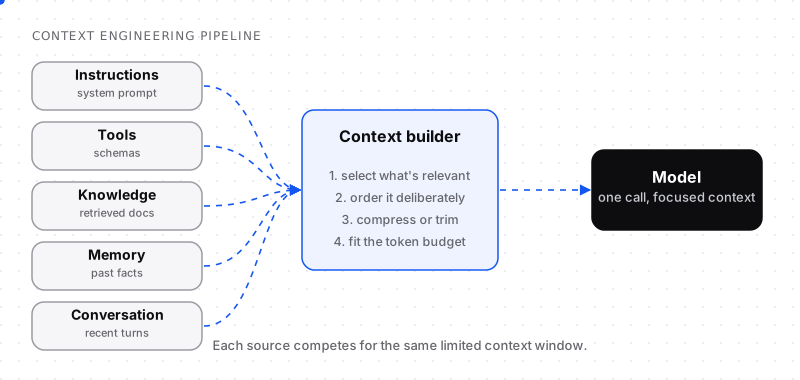
Every source competes for the same limited context window.
Prompt engineering is one part of this: the instructions are a source like any other. But in production systems the instructions are often a few hundred tokens, while retrieved documents, tool results and history can run to tens of thousands. That is where quality is won or lost.
Why bigger context windows didn't solve the problem
Modern models accept enormous inputs, so it is tempting to send everything and let the model sort it out. In practice this fails in three ways.
1. Quality degrades long before the limit
Research has repeatedly shown that models do not use long inputs uniformly. The well-known "lost in the middle" findings showed that information placed in the middle of a long prompt is used less reliably than information at the start or end. Later evaluations of long-context behaviour (often described as context rot) found that accuracy on many tasks drops as input length grows, even when the window is nowhere near full.
A model reading 100,000 tokens is not 50 times smarter than one reading 2,000 tokens. It is usually more distracted.
2. Irrelevant content actively misleads
Retrieval returns near-misses: a doc about a deprecated API version, a support ticket for a different product, a code file with the same function name. Each one is a plausible-looking distractor. The more of them you include, the more likely the model anchors on the wrong one.
3. Cost and latency scale with tokens
You pay for every input token on every request, and time-to-first-token grows with input size. Sending 40,000 tokens when 4,000 would do multiplies your bill and slows every response.
The lesson: the context window is a budget, not a bucket.
The four operations of context engineering
Almost every technique falls into one of four operations.
Select: include only what is relevant
Selection is about precision, not recall. Instead of "retrieve the top 20 chunks", ask "what is the smallest set of information that lets the model answer correctly?"
Practical moves:
- Retrieve generously, then filter hard. Pull 30–50 candidates with search, then rerank and keep the best handful.
- Filter by metadata before similarity. Product, version, language, permissions and date often eliminate most wrong answers before any embedding comparison.
- Load tools on demand. Agents with dozens of tools waste thousands of tokens on schemas they will never call. Group tools and expose only the group relevant to the current step.
- Drop resolved conversation turns. A support chat about a password reset does not need the greeting and small talk from twenty turns ago.
Order: put things where the model will use them
Order affects both quality and cost:
- Stable content first. System instructions, tool definitions and long reference documents that rarely change belong at the top. This also lets providers cache the prefix, which cuts cost and latency on repeated calls.
- Volatile content last. The user's current question and the latest tool result go at the end, closest to where the model starts generating.
- Group related material. Put each document's title, source and date together with its content so the model can cite and judge freshness.
- Repeat the key instruction near the end for long contexts. A one-line reminder of the output format after a large block of documents measurably reduces format drift.
Compress: keep the meaning, drop the tokens
Compression trades a little fidelity for a lot of space:
- Summarise old history. Replace twenty early turns with a short running summary of decisions and facts.
- Trim tool output. An API response with 200 fields rarely needs more than five. Extract them before they reach the model.
- Prefer structured facts to prose.
plan: pro, seats: 12, renewal: 2026-03-01beats a paragraph describing the same account. - Deduplicate. Retrieval often returns overlapping chunks from the same page; merge them.
Budget: give every source a ceiling
Decide in advance how many tokens each source may use, and enforce it in code.
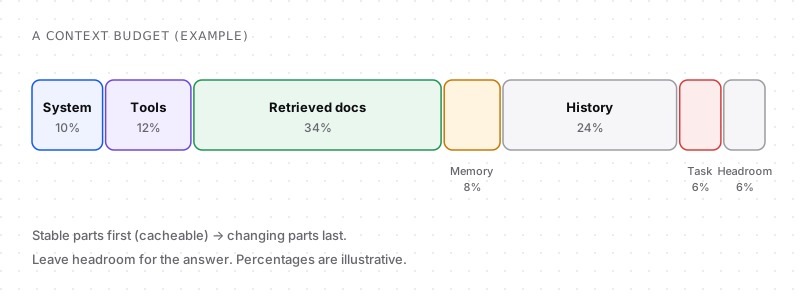
An illustrative budget. Your split depends on the task.
A budget turns vague advice into an engineering constraint. When retrieval returns more than its share, it has to rank harder. When history grows past its share, it gets summarised. And there is always headroom for the answer, because a context that leaves no room for output fails in confusing ways.
A context builder in code
Here is the shape of a simple context builder. The point is not the specific numbers but that each source is fetched, trimmed and assembled deliberately:
type Source = { name: string; content: string; maxTokens: number };

const countTokens = (text: string) => Math.ceil(text.length / 4); // rough estimate

function fit(text: string, maxTokens: number) {
  if (countTokens(text) <= maxTokens) return text;
  return text.slice(0, maxTokens * 4) + "\n…[truncated]";
}

export async function buildContext(userMessage: string, session: Session) {
  const docs = await search(userMessage, { filter: { product: session.product }, limit: 30 });
  const best = (await rerank(userMessage, docs)).slice(0, 5);

  const sources: Source[] = [
    { name: "instructions", content: SYSTEM_PROMPT, maxTokens: 800 },           // stable
    { name: "tools", content: toolsFor(session.step), maxTokens: 1200 },          // stable per step
    { name: "knowledge", content: best.map(formatDoc).join("\n\n"), maxTokens: 4000 },
    { name: "memory", content: session.facts.join("\n"), maxTokens: 500 },
    { name: "history", content: summariseOld(session.turns), maxTokens: 2500 },
    { name: "task", content: userMessage, maxTokens: 1000 },                       // volatile, last
  ];

  return sources
    .filter((s) => s.content.trim())
    .map((s) => `<${s.name}>\n${fit(s.content, s.maxTokens)}\n</${s.name}>`)
    .join("\n\n");
}
Notice the XML-style tags. Clear delimiters help the model tell instructions from data, which also matters for security: retrieved text should be treated as information, never as commands.
Context engineering vs prompt engineering vs RAG
These terms overlap, so it helps to place them:
| Prompt engineering | RAG | Context engineering | |
|---|---|---|---|
| Focus | Wording of instructions | Fetching external knowledge | Everything the model sees |
| Typical question | "How should I phrase this?" | "Which documents are relevant?" | "What is the best possible input for this step?" |
| Scope | One source | One source | All sources, order and budget |
| Main failure | Ambiguous instructions | Wrong or missing chunks | Noise, overflow, stale or conflicting info |
RAG is one input channel inside context engineering. Prompt engineering is another. Context engineering is the system that decides how they combine.
Patterns for agents
Agents make context engineering harder because the context changes on every step: each tool call appends a result, and long tasks can run for dozens of steps.
Patterns that help:
- Scratchpad notes. Let the agent write key findings to a notes file or memory store, then load only the notes, not the full transcript, on later steps.
- Result summarisation. After a tool call, keep a one-paragraph summary in the transcript and store the full output elsewhere in case it is needed again.
- Sub-agents with clean contexts. Delegate a focused subtask, like "find the config for service X", to a sub-agent that starts with a small, clean context and returns only its conclusion.
- Checkpoint and restart. For very long tasks, periodically compress the state into a brief handover note and start a fresh context from it.
How to tell if your context is the problem
When an answer is wrong, log the exact context that produced it and ask:
- Was the needed fact present? If not, it is a retrieval or selection problem.
- Was it present but buried? Move it, or remove the noise around it.
- Was there conflicting information? Add dates and sources, or filter stale versions.
- Was the instruction overridden by something in the data? Strengthen delimiters and instruction placement.
- Did the answer get cut off or skip format rules? Check headroom and repeat the format at the end.
You cannot debug what you do not log. Store the assembled context (or a hash plus the source IDs) for every request in development and for a sample in production.
A checklist for your next feature
- Write down every source the model receives and its token budget.
- Put stable content first and volatile content last.
- Filter retrieval by metadata, then rerank, then keep only the best few.
- Trim every tool output to the fields the model needs.
- Summarise conversation history beyond a fixed window.
- Leave explicit headroom for the response.
- Log the final context so wrong answers can be traced to their cause.
Context engineering is less glamorous than clever prompts, but it compounds: every improvement in what the model sees makes every model you use, today's and next year's, perform better.
Context engineering in practice: a before-and-after example
Here is a real-world pattern from a customer-support assistant.
Before (the "send everything" version):
- A 2,000-token system prompt full of rules accumulated over months.
- The top 20 retrieved help articles, about 12,000 tokens, including old versions.
- The full conversation history, 40 turns.
- Definitions for all 25 tools the assistant might use.
Result: slow responses, high cost and answers that sometimes quoted last year's pricing page.
After (the engineered version):
- A 600-token system prompt with the rules that actually change behaviour.
- Retrieval filtered to the customer's plan and the current docs version, reranked, top 4 kept.
- A running summary of the conversation plus the last 6 turns verbatim.
- Only the 5 tools relevant to billing questions, because the request was classified as billing first.
- The customer's plan, seat count and renewal date as structured facts.
Result: a context roughly a quarter of the size, faster answers and far fewer outdated replies. Nothing about the prompt wording changed. The improvement came entirely from what the model saw.
Prompt engineering techniques that still matter
Context engineering doesn't make classic prompting techniques obsolete; it gives them a place. These still earn their tokens:
- Few-shot examples: two or three input-output examples remain the fastest way to teach a format or a tone.
- Clear role and task framing: one or two sentences saying who the model is acting as and what success looks like.
- Step-by-step reasoning for multi-step problems, or simply using a model with built-in reasoning.
- Explicit output format: a schema, or a short example of the expected structure.
The difference is that in a context-engineered system these are budgeted components, not an ever-growing wall of instructions.
Common context engineering mistakes
- Treating retrieval as "more is better". Recall without precision floods the context with near-misses.
- Letting the system prompt grow forever. Every incident adds a rule; nobody removes any. Audit it quarterly.
- Including raw tool output. Huge JSON responses crowd out the information that matters.
- Mixing instructions and data. Without clear delimiters, the model can't tell what to follow from what to analyse. This is also how prompt injection gets in.
- No versioning of context. If you can't reproduce exactly what the model saw, you can't debug it.
- Ignoring freshness. Old documents without dates compete equally with current ones.
Frequently asked questions
What is context engineering in AI?
Context engineering is the practice of designing everything a large language model sees on each request: instructions, retrieved documents, tool definitions and results, memory and conversation history. It covers what to include, where it comes from, what order it goes in and how many tokens each part may use.
Is prompt engineering dead?
No, but it is now a smaller part of the job. Clear instructions still matter, yet in production systems most quality problems come from missing, noisy or badly ordered context rather than from the wording of the prompt. Prompt engineering has become one component of context engineering.
What is the difference between context engineering and RAG?
RAG (retrieval-augmented generation) fetches external documents and adds them to the prompt. Context engineering is broader: it decides how retrieved documents combine with instructions, tools, memory and history, how much space each gets and in what order, and what to leave out.
Does a bigger context window mean I don't need context engineering?
No. Models use long inputs unevenly, irrelevant content can mislead them, and every extra token adds cost and latency. A large window gives you more room, but you still need to choose carefully what goes into it.
How many tokens should I send to an LLM?
There is no single number. Send the smallest context that lets the model answer correctly, and leave headroom for the response. Many production systems work well with a few thousand tokens of carefully selected context instead of tens of thousands of loosely related ones.
How do I start practising context engineering?
Log the full context of a few wrong answers and check whether the needed information was missing, buried or contradicted. Then add a token budget per source, put stable content first, rerank retrieval results, and trim tool outputs. Those four changes fix a large share of problems.
What are examples of context engineering?
Filtering retrieved documents by product and version before ranking them, summarising older conversation turns, loading only the tools relevant to the current step, trimming API responses to the fields the model needs, and storing user preferences as short structured facts that are added to every request.
What skills does a context engineer need?
A mix of software engineering and LLM understanding: retrieval and search (chunking, filtering, reranking), data modelling, token budgeting, prompt design, evaluation and debugging with logs. Most of the work is systems thinking about what information flows into each model call.


Comments